Connecting utility accounts once
How changing one assumption helped completion rise from 5.1% to 29.9%.
This one waits for the guestbook. Leave your name and email and it opens.
Still shut after that? Email me and I’ll send it another way.
Introduction
Runwise needs utility bills to calculate how much energy a building saves. Getting those bills meant asking customers to connect their utility accounts. Almost nobody finished.
The flow was built around a tidy assumption: one building, one utility login. Real portfolios were not tidy. One login might cover a hundred buildings. One building might need four logins. Sometimes both were true.
I redesigned the product around the account instead of the building. Over nine months, completion rose from 5.1% to 29.9%. That number has an asterisk. I’ll get to that.
The old flow worked until the utility changed its website
Heating is one of an apartment building’s largest expenses. Runwise proves savings with utility bills, but those bills live inside someone else’s website, behind someone else’s password.
The old product copied data from utility websites one building at a time. It worked in New York. Then a utility moved a form field or changed a page and the connection broke.
Even when it worked, the shape was wrong. A customer with one hundred buildings could enter the same login one hundred times.
A new verification service gave us a more reliable connection and support for more utilities. It did not tell us how the product should work. That part was ours.
We had modelled the customer’s world backwards
I designed the connection flow, wrote much of its front-end code, and made the case for changing the data model underneath it. I also designed the states for expired credentials, partial coverage, portal changes, and failures we could not explain.
And to be clear, I did not choose or build the verification service. Other engineering work shipped during these nine months too, so the honest claim is that I contributed to the increase, not that I caused all of it.
The old flow started with a building and asked for that building’s login. It sounds reasonable. It was also the source of most of the work.
Real accounts looked like this:
- One login covering four buildings.
- Four logins covering one building.
- An account covering three of yours and two belonging to somebody else.
I proposed reversing the relationship. Start with the utility account. Connect it once. Find every building and meter behind it. Then ask the customer to confirm the matches.
This was not a screen-level fix. Engineering had to change how the product stored the relationship. The team agreed to do the larger job.
My first redesign moved the work
The first version started from the right object and still failed. It listed the utility accounts, walked through setup, then asked the customer to match every meter to a building by hand.
A login covering fifty buildings still meant fifty lookups. I had moved the work, not removed it.
The product needed to make the first move. We compared meter and building addresses, prepared the likely matches, and asked the customer to review them. One review replaced fifty searches.
Authenticate once, then connect the portfolio
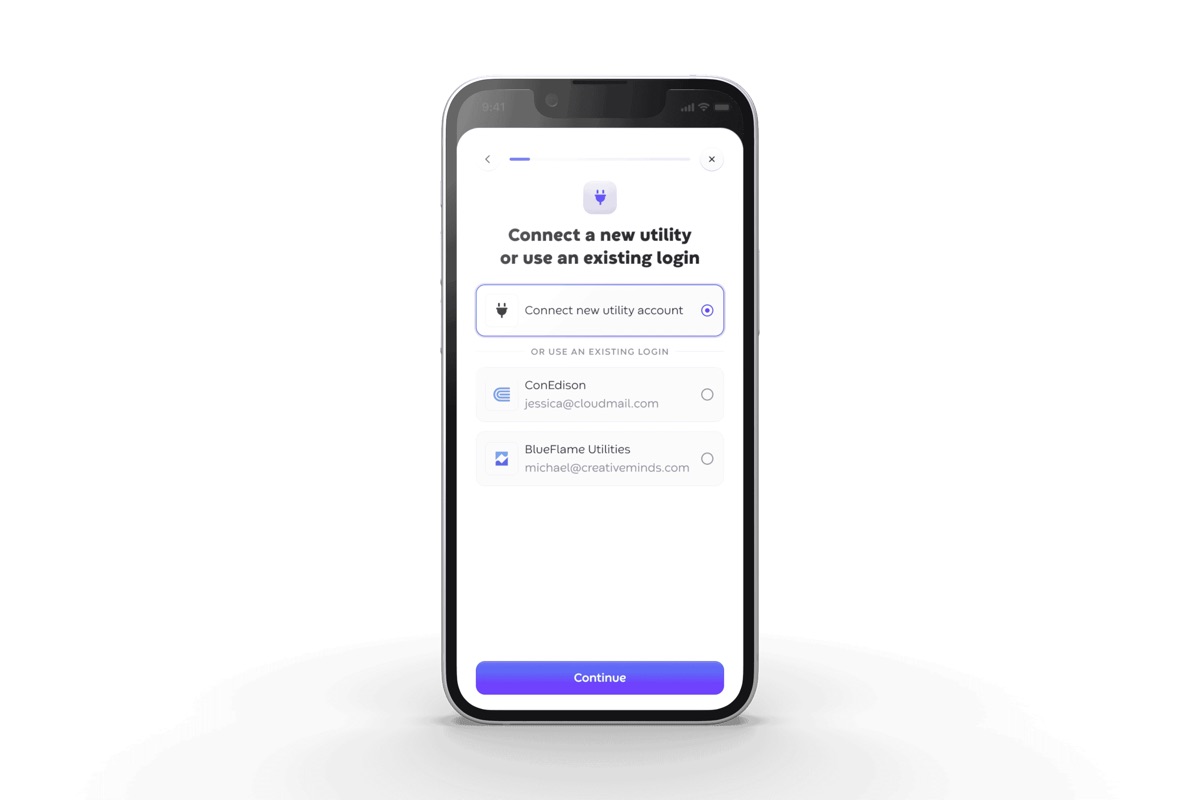
The shipped flow did five things:
- Choose the utility company or reuse a saved login.
- Sign in on a screen carrying the utility company’s logo, so it is clear whose password they are entering.
- Confirm the likely meter for the current building.
- Review the other buildings and meters covered by the same account.
- See what you connected, meter by meter, before it closes.
The fourth step changed the economics of the flow. A customer could sign in once and connect every building the account covered. The larger the portfolio, the more work the product removed.
Before Repeat the work for every building
-
Start with a building
- Choose one property
- Find its utility
-
Enter credentials
- Type the account login
- FrictionExpired passwords stop the flow
-
Copy the account
- Read the utility website
- FrictionPortal changes break the connection
-
Do it again
- Connect one building
- FrictionRepeat for every property
After Authenticate once, then connect the portfolio
-
Choose an account
- Pick the utility
- ShortcutReuse a saved login
-
Verify
- Sign in once
- See progress while it works
-
Match
- Compare meter and building addresses
- System workSuggest likely matches
-
Review
- Confirm the current building
- Correct other matches
-
Connect
- PayoffLink many buildings at once
- Review every connected meter
Which utility provides gas at 4117 North Sheridan Road?
A blank screen after a password feels broken
Verification happened in the background and utilities answered at their own pace. After entering a sensitive password, customers sometimes saw nothing move. Of course they assumed it had failed.
I added a small status tracker for each stage. We called it the pizza tracker.
It worked like delivery tracking: show what has happened and what is happening now, but do not invent a finish time. The useful message was simply, we have your login and we are still working.
Failure was not an edge case
I designed the four failures we saw most often:
- Credentials expired.
- Partial coverage.
- The portal changed overnight.
- Verification failed and won’t say why.
When a product depends on outside systems, failure is part of the product.
Every state needed to answer the same question: is this working, still processing, or waiting for me?
The result has an asterisk
Completion reached 29.9% after nine months. Across the feature’s entire life, including the difficult early months, it was 10.4%. Both numbers are true.
We only measured the entrance and the exit. I cannot tell you which middle step lost the most people or which failure mattered most.
That was a miss. Instrumenting every step would have turned nine months of iteration into a series of experiments. I should have made it part of the first plan.
The better proof came later
The strongest evidence was not the 29.9%. It was what happened when another team built water-account connections later.
They used the same account-first model. Sign in once, find every covered building, connect them in one session. Nobody reopened the debate.
It also exposed what my version had not solved: the product still struggled to explain the relationship between a login, a utility account, and the buildings it covered.
A connected account could still look too much like an account with a dead password. Support still had to untangle the difference.
I fixed the largest wrong assumption and left an important relationship unfinished.
The bigger picture
What I want you to take from this is the shape of the year. We reversed the model, asked the product to propose the matches, and treated failure as part of the product instead of an edge case. Then another team reused the pattern without reopening the debate.
We’re not done. The product still struggles to explain the relationship between a login, a utility account, and the buildings it covers. I fixed the largest wrong assumption and left that one unfinished.
Next